

Business email compromise cost reported victims $2.94 billion in 2023 alone, according to the FBI’s Internet Crime Complaint Center, consistently one of the costliest categories of internet crime tracked. Much of it traces back to the same gap: a domain that never tells the receiving mail server who’s actually allowed to send email on its behalf.
That’s what SPF, DKIM, and DMARC exist to fix. Most IT teams have heard all three acronyms. Fewer could explain what each one actually does, or why having just one isn’t enough.
What each one actually does
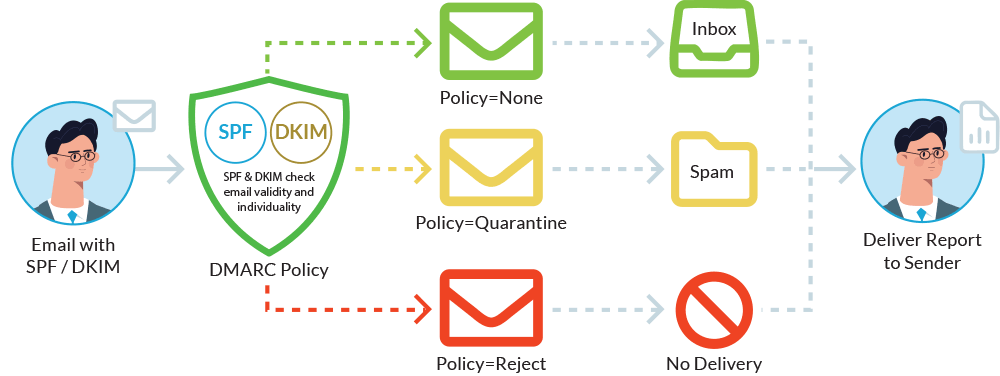
SPF (Sender Policy Framework) publishes a list of servers allowed to send email for your domain. A receiving server checks incoming mail against that list. It’s the oldest of the three and the easiest to set up, but it only verifies the sending server, not the message itself.
DKIM (DomainKeys Identified Mail) adds a cryptographic signature to outgoing email, proving the message wasn’t altered in transit and genuinely came from your domain. It verifies the message; SPF verifies the server. Neither alone confirms the sender is who they claim to be.
DMARC (Domain-based Message Authentication, Reporting & Conformance) is the policy layer that ties the other two together. It tells receiving servers what to do when a message fails SPF or DKIM checks, monitor it, quarantine it, or reject it outright, and sends you reports on what’s happening across your domain’s email traffic.
| Type | Verifies | Doesn’t cover |
|---|---|---|
| SPF | The sending server is on your authorized list | Whether the message itself was altered |
| DKIM | The message wasn’t altered and came from your domain | Which server actually sent it |
| DMARC | Ties SPF and DKIM together, sets the enforcement policy | Has nothing to enforce without SPF/DKIM configured underneath |
Why one isn’t enough
SPF without DMARC still lets a spoofed message through if the attacker sends from a server not on your list, but receiving servers don’t take action without a DMARC policy telling them to. DKIM without DMARC proves your legitimate messages are authentic but does nothing to stop someone spoofing your domain elsewhere. And DMARC without SPF or DKIM configured underneath it has nothing to actually enforce. All three work as a set. Missing one leaves the other two only partially effective.
Where most domains actually stand
DMARC policies work in stages. p=none simply monitors traffic and reports on what it sees without blocking anything. p=quarantine routes suspicious mail to spam. p=reject blocks it outright. (For the full walkthrough on moving between them, see our guide on choosing the right DMARC policy.) That’s a reasonable starting point, but plenty of domains never move past it. The record exists, the box is technically checked, and spoofed mail keeps landing in inboxes anyway.
What to do next
Check whether all three records exist for your domain, and if DMARC is set to anything past p=none. Moving from monitoring to enforcement, meaning p=quarantine (failing mail goes to spam) or p=reject (failing mail gets blocked outright), is usually a staged process, not a single switch, since it requires confirming every legitimate sending source is properly authenticated first. That’s worth doing deliberately rather than skipping.
Want to know exactly where your domain stands on SPF, DKIM, and DMARC?
101domain’s Managed DMARC service handles setup, monitoring, and the move to full enforcement without breaking legitimate mail flow.